 Bristol Bus Buddy
Start where you are.
Nearby boarding stops are shown by direction, so two stops with the same name do not become the same journey.
Bristol-first · Bath & North Somerset · independent
Live help for the next bus: nearby boarding stops, clear scheduled departures, and live information only when the data genuinely supports it.
Now on Google Play for Android. Get Bristol Bus Buddy on Google Play, or search for “Bristol Bus Buddy”.
Bristol Bus Buddy now also serves nearby boards in Bath, Clevedon, Portishead and Nailsea. Coverage varies by route and operator; check operator information for critical changes.
Open Bristol Bus Buddy in Safari, tap the Share button (the square with an arrow), then choose Add to Home Screen.
It will appear as an icon and open full-screen, like an app. If you arrived from WhatsApp, open the link in Safari first.
Open Bristol Bus Buddy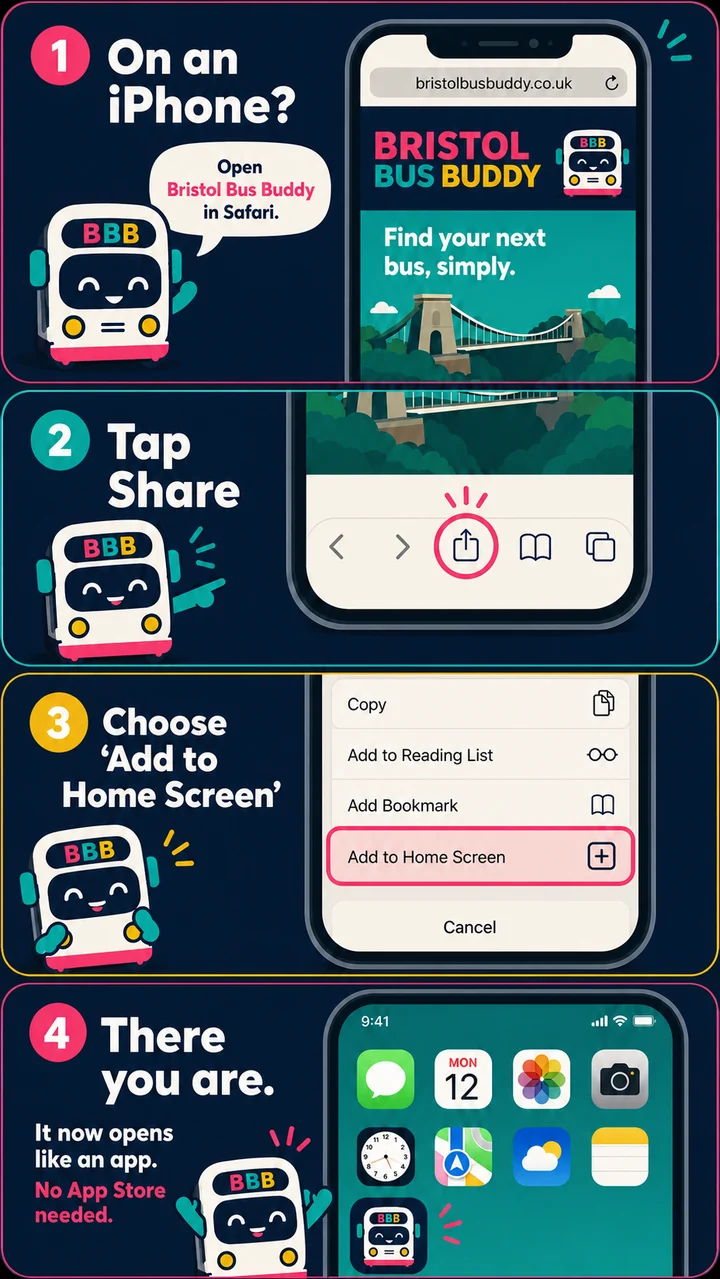
Live bus board
Use your location if you want to, or start from the Bristol fallback. No account needed.
Bristol Bus Buddy is a small, independent companion for the question people ask at the stop: which side, which bus, and where does this departure actually go?
Nearby boarding stops are shown by direction, so two stops with the same name do not become the same journey.
Scheduled times and fresh live information are labelled separately. A bus position is not quietly turned into a promise.
Open a plausible service and see its upcoming stops before committing to the wrong direction.
The board opens with a sensible Bristol fallback, then lets you choose your own location when you are ready.
It is Bristol-first and now also provides nearby boards in Bath, Clevedon, Portishead and Nailsea. It does not yet claim to cover every route or operator; coverage will be stated plainly as it changes.
No. Location is optional. If you choose it, the app uses it in your browser to find nearby stops; it does not require an account.
No. Bristol Bus Buddy is an independent HyperPoint Ltd product. Always check operator information for critical disruptions, accessibility requirements and service changes.
Use the iPhone guide above. Open Bristol Bus Buddy in Safari, tap Share, then choose Add to Home Screen. No App Store download is needed.
Allow optional usage analytics so we can see which pages and features are useful. You can say no and change this later in Privacy.